- WhatTheAI
- Posts
- ⚠️ Microsoft Admits Copilot Is for Entertainment
⚠️ Microsoft Admits Copilot Is for Entertainment
Plus: New Gemma 4 locally from your laptop

Welcome to WhatTheAI, where artificial intelligence comes to life. Stay updated on the hottest AI breakthroughs, explore practical AI tools, and follow step-by-step tutorials; all designed to make AI simple and accessible for everyone. Let’s explore the future together.
AI Picks of the Day:
🌍 Real-Time AI Subtitles That Understand Every Word
🖥️ Run Gemma 4 on Your Laptop: Step-by-Step Guide
💸 Anthropic hits Claude Code users with new OpenClaw fees
⚒️ New AI tools to add in your pocket
💡 25 MidJourney Prompts Every Designer Needs
All this and many more - Let's get Started!
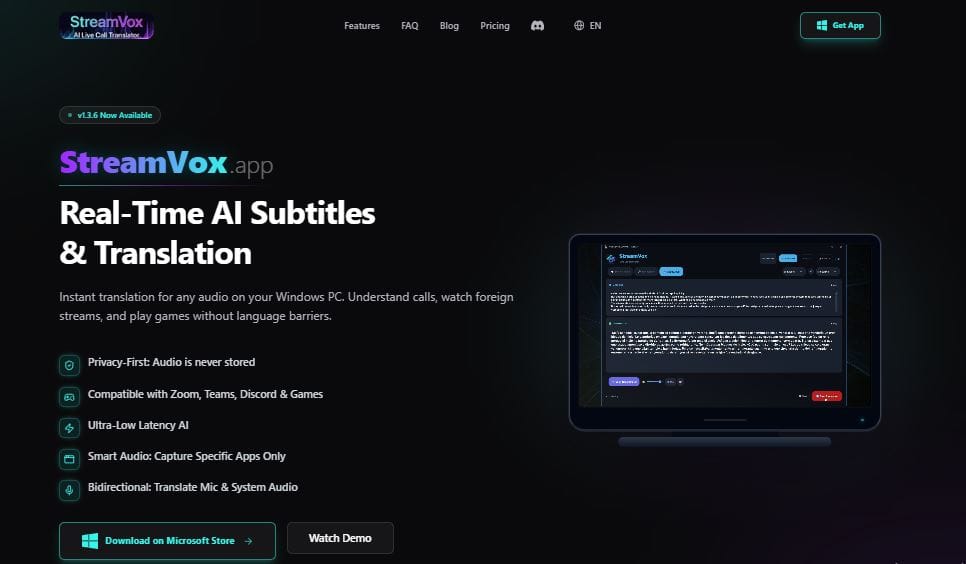
🌟Today’s Spotlight: StreamVox
Real-Time AI Subtitles & Translation
Hearing isn’t enough if you don’t understand.
StreamVox turns any audio ; videos, calls, or meetings into live, translated captions in real time.
You can customize them for easy reading, so following conversations or content in another language becomes simple and seamless.
Master AI: Three Times Weekly
💻 Use the new Gemma 4 locally from your laptop (Full tutorial)

Hello everyone 👋
Today, we’re showing Gemma 4, Google’s AI model that runs locally on your hardware.
No tech expertise needed!
You’ll learn how to:
Test it instantly in your browser via Google AI Studio
Easily download and run it locally with Ollama
Use it for writing, image understanding, coding, and problem-solving
Run it from the command line for smooth workflows
By the end, you’ll know how to turn any device into a powerful, private AI assistant; fast and hassle-free.
Today’s Hottest in AI
🔥 Microsoft: Copilot Is “Just for Fun”

Microsoft is flagging Copilot as “for entertainment purposes only,” warning users not to rely on it for important advice. This disclaimer, part of its terms of use last updated on October 24, 2025, has drawn attention recently as media and social posts highlighted it. Microsoft says this “legacy language” will be updated to better reflect how Copilot is used today.
🔎 Quick AI highlights
🎥 Meet PikaStream 1.0 ; Real-Time AI Video Chat Like Never Before.
🛑 Anthropic adds new OpenClaw fees for Claude Code users.
🤖 OpenAI calls for robot taxes to face AI disruption
🛠️ New featured tools
📝 FoundersPlan : AI tool that creates 15+ documents, from business plans to contracts and policies.
🔗 Insightful Pipe : Connects your marketing data to AI assistants, like Claude, and get real-time answers from 35+ platforms.
🎯 Offer Bull : AI interview coach giving live suggestions, guiding clear answers, and letting you practice confidently in a realistic environment.
🖼️ 3DAIStudio : Instantly turns your images or text into high-quality 3D models.
🎙️ Podcast Transcript : AI that converts podcasts into text for easy reading, sharing, and referencing.
✨ Prompts Show
🖼️ 25 MidJourney Prompts That Make Your Designs Pop

Explore this guide of ready-to-use MidJourney prompts for graphic design. It offers prompts for creating logos, posters, social media visuals, illustrations, and more. Helping you generate professional, creative designs quickly without needing complex instructions.

✨ Big Thanks for Reading!
That’s all for now! We hope you found this week’s AI highlights insightful.
But the journey doesn’t stop here—our next newsletter will bring you even more step-by-step AI tutorials, the latest updates from the AI world, and powerful new tools to explore. Until then, keep experimenting and discovering the future of AI with WhatTheAI!
Don’t forget to follow us on X , LinkedIn, and Instagram so you never miss an update.